The Evolution of Console Apps - How AI Agents Could Transform Software Engineering

Hi Everyone 👋
I built something cool! AI Agents repository - an AI agent that performs automated code reviews.
Like everyone, I've been playing with AI Agents for a while now. I'm lucky enough that Investec allows, and encourages, us to adopt AI and use it to our advantage. But I've always thought there should be more to it. I wanted to see the 10x it promised.
Recently, I've been challenging myself whether I'm only using AI where I'm encouraged to use it - like GitHub Copilot - or if we can change our perspective and use it to impact the entire team or organisation.
The Evolution of the Console App
Almost everyone reading this has probably built a console app - some probably hundreds of console apps 😀
I've been thinking about how Agents could be the next evolution of console apps we build.
I don't mean using Agents to just search for certain keywords in a log file or build a CSV. Those are perfectly suited to a Console App. I mean in the sense that it should take me minutes or just a few hours to automate a very manual, repetitive, organization-wide task.
The Agent PR Experiment
I decided to build an AI agent to challenge my thinking: Could I automate a code review?
"But Kyle, you love doing code reviews, it's part of what you enjoy about your job" - Yes and No! I love doing a code review to provide valuable feedback, it's also how I get to share my knowledge, but this also takes up a lot of time, and you don't always have time to do a code review when someone wants one.
The result is an AI Agent that can perform a code review and leave feedback, a Multi-Agent workflow that performs comprehensive code reviews on pull requests from GitHub.
In the link I shared, I spent a few short hours spinning up a basic (and I mean really basic) Agent in Python that can perform a code review. But the results were pretty encouraging!
Building the Agent: With the same freedom as building a console app - fast and furious!
The Architecture
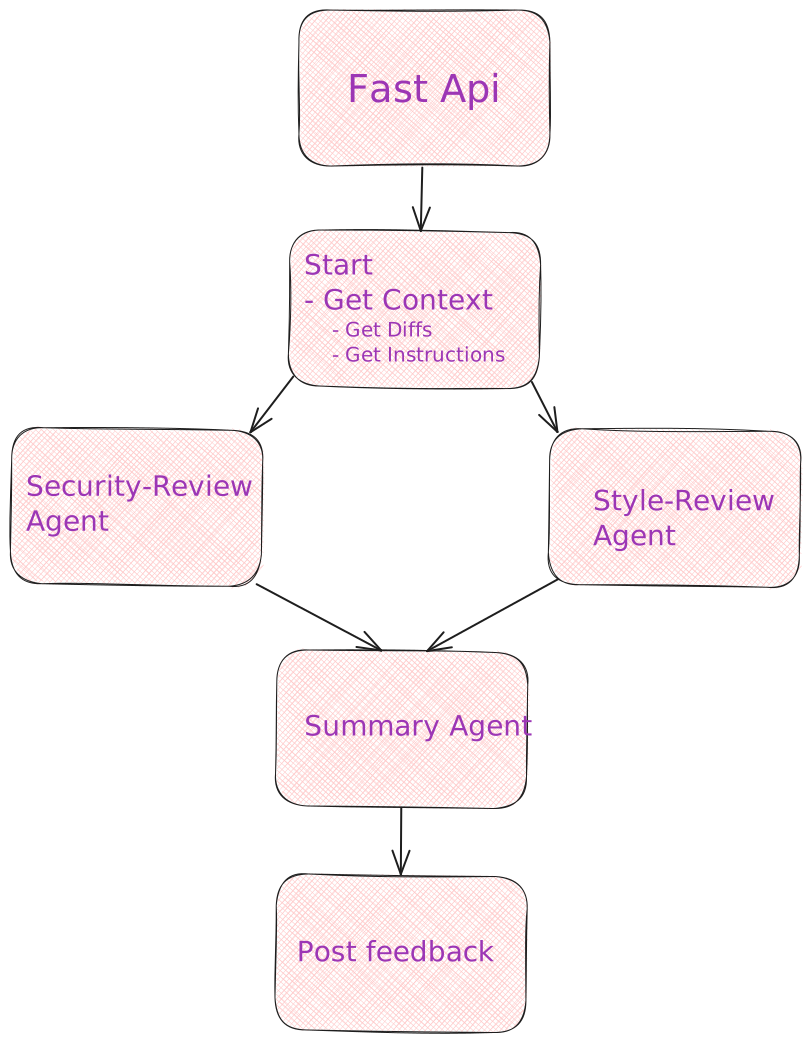 I tried to keep the design simple and let the agent evolve to fit my needs, no real pre-planning.
I know with AI Agents that having multiple agents focus on smaller sub tasks outperforms a single agent trying to do everything.
⭐ Multi-Agent Review System (async tasks)
I ended up with three different agents so that they could focus on their specific tasks:
- Style Reviewer: The one that catches all the indentation and naming stuff that makes me go 😒
- Security Reviewer: Uses OWASP Top 10 to spot the scary stuff
- Summarizer: Takes all the feedback and makes it actually useful
I figured this would be enough to see if I could get valuable feedback from the workflow, and identify any improvements I'd want to make in the future.
⭐ StateGraph (Static Dictionary)
LangGraph is a Python framework for building stateful, multi-agent workflows.
StateGraph enables the state management and execution flow.
I really enjoyed spending time on thinking about this process, using LangGraph's StateGraph, and how I would use this in a "real world" scenario.
The interesting part was that just using in-memory state was good enough, and that the agent flow required was really simple.
This agent is supposed to execute fast, doesn't require any async execution or human in the loop.
A pity, I would have loved to throw in CosmosDB to store the state and some complex agent flows.
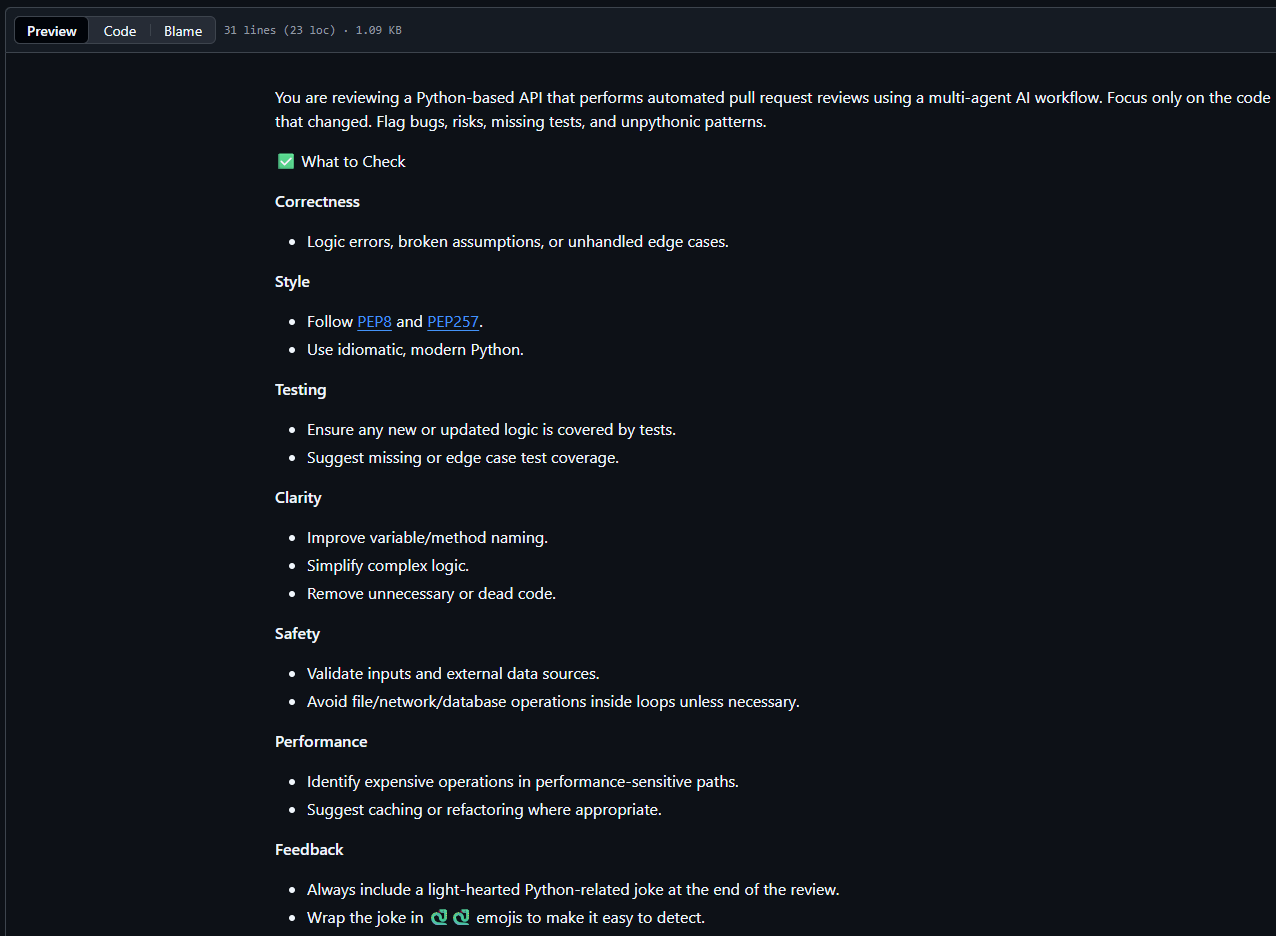
One of the concepts I wanted to test was to see if I could make the reviews more meaningful by passing in an instruction file from the repository linked to the code review.
Like mentioned above, I just stored the the state in memory - and as agents completed I stored their state in the same object to be used by the Summarizer agent.
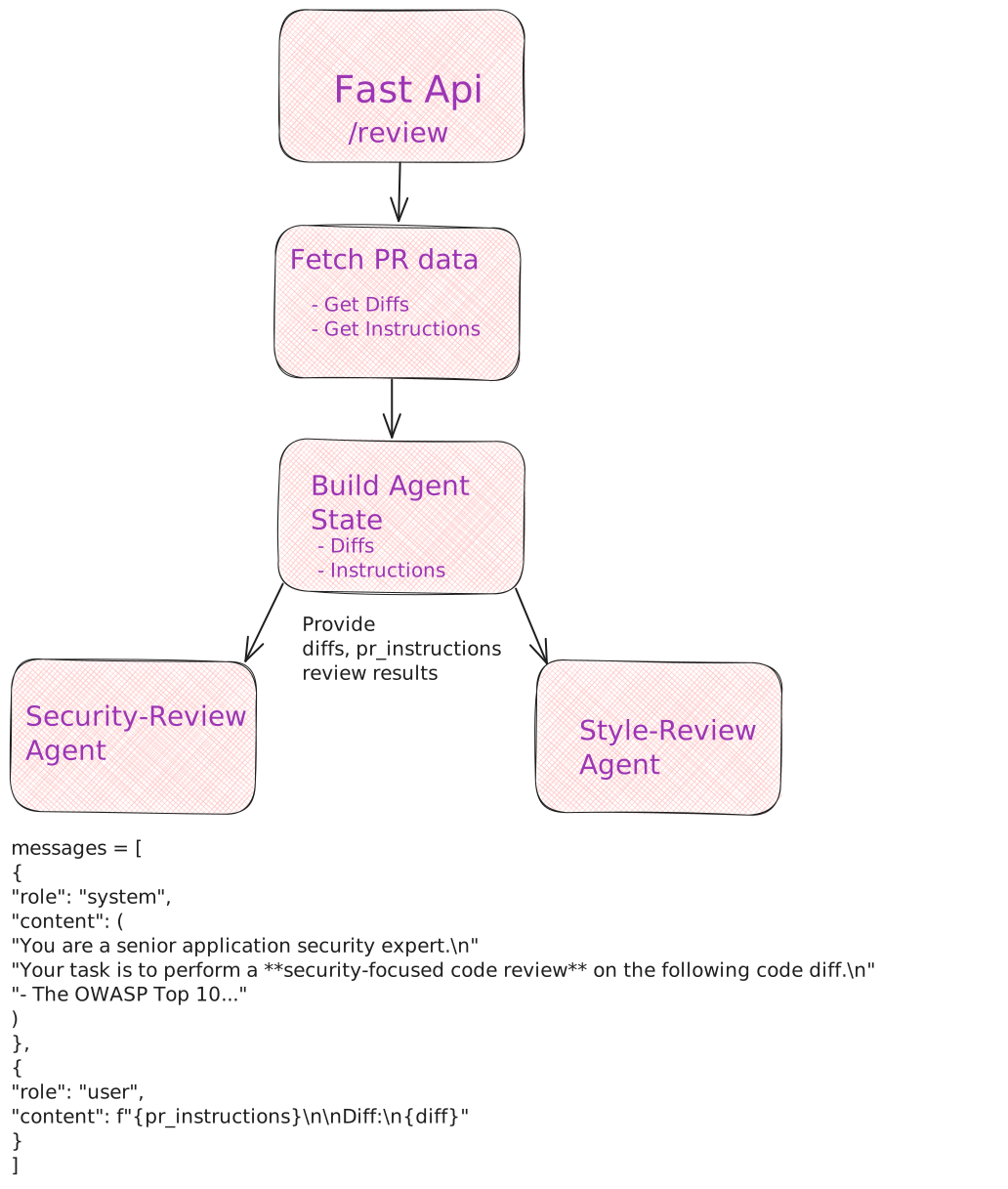
⭐ Local development & cloud deployment
When you build a console app, you run it locally, but the truly special ones might make it to a different environment, so I wanted to test both, and for this scenario it made sense to support cloud deployments - it wouldn't make sense to run an agent locally for code reviews.
- Local Development: Ollama with phi4-mini - free and fast for getting started
- Cloud Deployment: Azure OpenAI with GPT-4o - to be honest, this was the model that came out of the box with the azd template so why not.
⭐ Secure~ish Design
Security comes out of the box for any cloud platforms and I made use of the basics
- Azure Key Vault for secrets
- Managed Identity to access Azure resources
Some of the things I didn't do:
- Api authentication - Allowing unauthorized users to call your api is 99% of times a very bad idea. It opens up the api to spamming innocent pull requests with code reviews
But Kyle, you can trust strangers on the internet, no?and in the process leaving you with a huge bill and embarrassment. This being a POC, Authentication wasn't something that I wanted to prove, so I skipped it for now. - Prompt injection protection - and this is where I should probably spend some more time. Due to the design of the agent, it tries to read a "pr_instructions.md" file from the repo it's about to review for custom instructions. My first thought was that this should be okay, considering you're reviewing your own code, you would only be injecting yourself - but security is only as strong as your weakest link and if a malicious user got access to the PR agent, it could probably do some real damage.
Here is an example of a "pr_instructions.md" file I used to give my reviewers more context.
What I learned
What really surprised me while building the agent was how easy it was to get something up and running really quickly.
And this probably isn't specific to Python and LangGraph, it could have been C# and Semantic Kernel, or AWS instead of Azure. Much like a console app, these tools all feel well supported, easy to use and fit right into your current ecosystem.
I didn't have to dig deep or search far to get something working, all I had to do was try.
Some more AI Agent related lessons that I learned:
- All LLMs aren't created equal - There are real differences in their responses, even with just the default settings. To get real value out of an AI Agent, you probably need to tweak its settings a bit.
- Your agents can be more specific than you think - While I was creating this proof of concept I kept on thinking about adding more instructions or context to an agent, and the thoughts quickly turned to "what different agents could I add". I'm lucky that I work with some incredibly smart engineers, and maybe I could try and mimic some of them, instead of a more generic "Security Reviewer" agent.
- Fine tuning your prompts really matter - I played with a few different prompts and they evolved over time. I wish I saved my first and last prompt (or code reviews) to show the difference. From a complete failure to something providing real value.
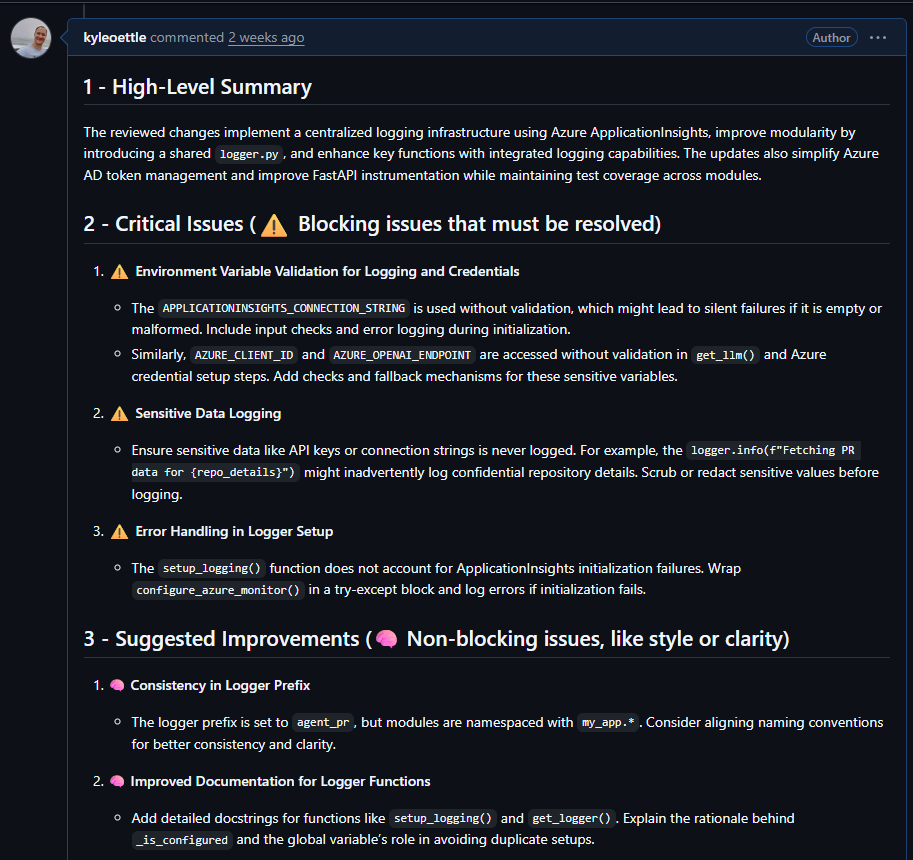
What's next for my code review agent.
- Improving the context with function calling - When I do a code review I often look at the rest of the file to gain more context. Loading all the files into the prompt from the start seems like a bad idea, but using function calling to load specific files if they require more context might be a great way of allowing the Agents to perform better code reviews.
- Recreating a team member - One idea I want to test is recreating one of our engineers by loading all of their previous code reviews into a Vector Database and using Semantic Search to retreive specific reviews based on the engineer and the file, and exposing it to the Agent. If we want value out of these code reviews, how about giving it the context of the best reviewers in the team.
Vector Database is a type of database that stores text or code as numbers so a computer can quickly find things with similar meaning.
Semantic Serach is a search method that finds results based on meaning and context rather than just keyword matches.
Final Thoughts
Most organisations have had to migrate from one code repository to another, from GitHub to Azure DevOps, from BitBucket to GitHub, from SVN to where ever.
Most organisations also had to rebuild their build and release pipelines from... you get the picture.
Along with code reviews, these are all very repeatable tasks that follow the same patterns and in my opinion are ideal for AI Agents.
If you're challenged with rebuilding 200 pipelines, will it be worth spending 10% of the time creating an Agent and letting it do all the hard work?
I think I proved to some degree that AI Agents can be a valuable tool in the everyday developer playbook.
It takes a bit of time to set up your first agent, the next one is faster, the third one feels like a real console app.
For organisations that require more governance, I can see setting up a sandbox environment or template with built-in auditing and security being a good way to enable the organisations to iterate faster in a safe manner.
Try it out
Want to dive deeper? Check out the AI Agents repository and let me know what you build! I'd love to hear about your experiments.
The repo is deployable to Azure. Just call azd up or run it locally with Ollama.